


Roll A Gnome Script goes well past a basic auto roll toggle, and the reason is that a script rolling as fast as possible without any filters usually ends up burning through cash on gnomes you didn’t actually want. Rarity Selection and Gnome Selection solve that by letting you tell the script exactly what to keep rolling for instead of stopping at the first thing that hits, the same kind of targeted approach players use on the Slots RNG Inf Money Script when a specific outcome matters more than speed.
The pacing controls matter almost as much here. Roll Delay and Buy Delay let you slow the script down to whatever speed feels safe, and Maximum Price stops it from buying rolls once the cost climbs past a point you’re comfortable with, while Keep Money holds back a reserve so you’re never rolled down to zero by accident.
Roll A Gnome Script Features
- Auto Roll: rolls continuously without manual input
- Auto Buy Roll: purchases rolls automatically as funds allow
- Roll Delay: sets how fast rolls fire
- Buy Delay: sets how fast purchases fire
- Maximum Price: caps how much the script will spend per roll
- Keep Money: reserves a set amount of cash the script won’t spend
- Rarity Selection: targets specific rarities to roll for
- Gnome Selection: targets specific gnomes instead of rolling blind
- Inventory Space Check: checks your inventory before rolling
- Leave Inventory Slots: keeps a set number of slots free
- Wait Until Not Rolling: prevents the script from triggering mid-roll
- More Features: additional automation toggles are built into the menu
Inventory Space Check and Leave Inventory Slots work together to stop the script from rolling into a full inventory, and Wait Until Not Rolling keeps it from double-triggering mid-animation, a small detail that actually breaks a lot of roll scripts that don’t account for it, similar to the pacing options built into the Container RNG Script.
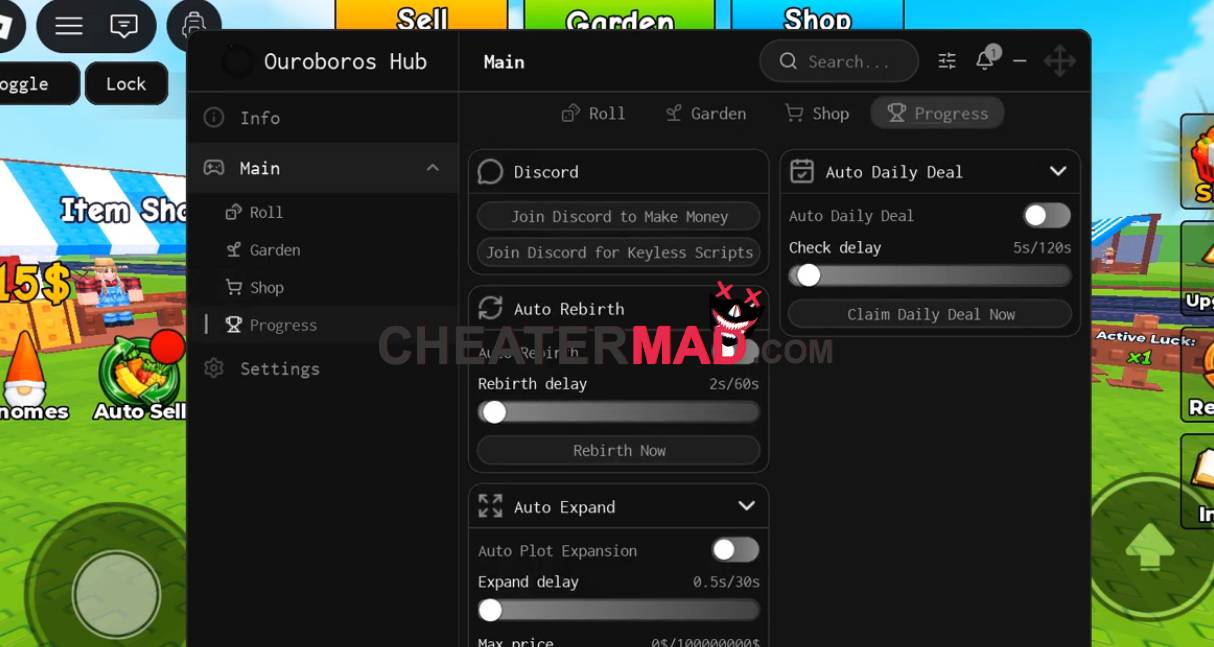
How To Use Roll A Gnome Script
- Load into Roll A Gnome and get your executor ready
- Paste the script code below in
- Execute and wait for the menu to load
- Set your Rarity Selection and Maximum Price before turning on Auto Roll so it doesn’t waste cash rolling blind
Roll A Gnome Script Code:
loadstring(game:HttpGet("https://raw.githubusercontent.com/joustingmatch/Ouroboros/main/loader.lua"))()
