


Poly Loot Script covers both the combat and collection sides of this Roblox loot-farming game. Auto Farm attacks nearby enemies automatically, and Target Mode & Enemy Selector lets you control exactly how targets get picked instead of the script engaging randomly, with Nearby Threat Limit capping how many threats it handles at once, similar to the target-controlled combat behind the Iron Soul Dungeon Script 2026, another combat-farming game where filtering engagements matters as much as raw damage output.
Poly Loot Script Attack Evasion avoids incoming hits when possible, and HP Retreat / Resume pulls you back at low health and picks farming back up automatically once you’re safe. Search Range & Move Speed and No Dash Cooldown round out the mobility side.
Poly Loot Script Features
- Auto Farm: attacks nearby enemies automatically
- Target Mode & Enemy Selector: controls how targets are chosen
- HP Retreat / Resume: retreats at low HP and resumes automatically
- Auto Collect Loot: collects loot within a chosen range
- Rarity/Rank Filters: controls which gear gets prioritized
- Live Farming Status: tracks kills, XP, coins, and deaths in real time
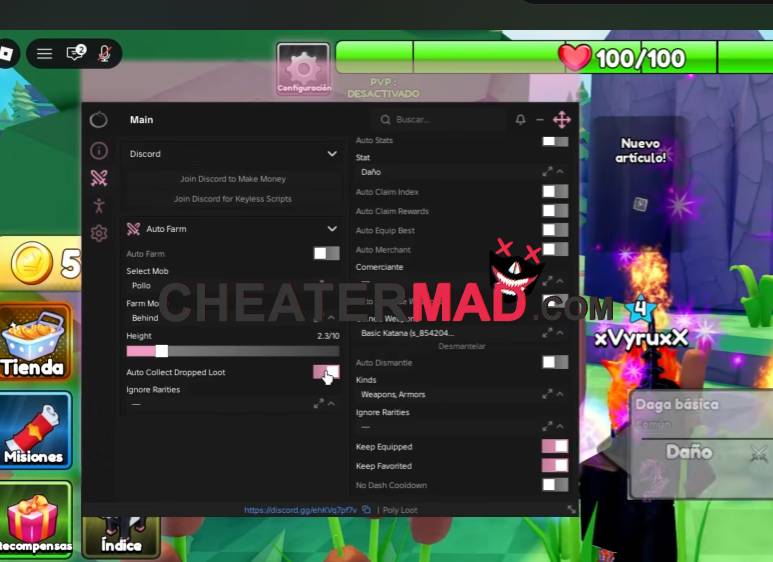
Loot & Collection covers Auto Collect Loot with an adjustable Collection Range, and Armor, Favorites & Rarity/Rank Filters control exactly what gear gets prioritized instead of the script grabbing everything indiscriminately, the kind of filtered looting behind the Loot Up Script 2026 where prioritizing quality over quantity actually matters. Live Farming Status tracks runtime, kills, XP, coins, pickups, and deaths in real time, giving you an actual read on how a session is going instead of guessing.
How To Use Poly Loot Script
- Load into Poly Loot and open your executor
- Paste the script code below
- Execute and wait for the menu
- Set your Rarity Filters and Target Mode first, then turn on Auto Farm and Auto Collect Loot
Script Code:
loadstring(game:HttpGet("https://alterhub.site/loader.lua"))()
