


Kick Ball to Space Script runs the whole power and upgrade loop in this Roblox kicking game, duping your cash and buying every upgrade for you while you stay AFK. It runs keyless with Xeno Executor and is updated as of July 2026, so you just copy the code below and paste it in to activate every feature. If you like these power and progression games, the My Wood Farm Script runs on a similar buy and grow loop.
Kick Ball to Space Script Features
- Dupe Cash: duplicates your cash so you can afford upgrades far faster than earning it normally
- Auto Power: boosts your kicking power automatically without any manual training
- Auto Buy Ball: purchases new balls for you as soon as you can afford them
- Auto Buy Trick: unlocks tricks automatically to expand your move set
- Auto Buy Jersey: grabs new jerseys for you without any manual shopping
- More Features: extra automation toggles are built into the menu
Kicking the Ball as Far as Possible on Autopilot
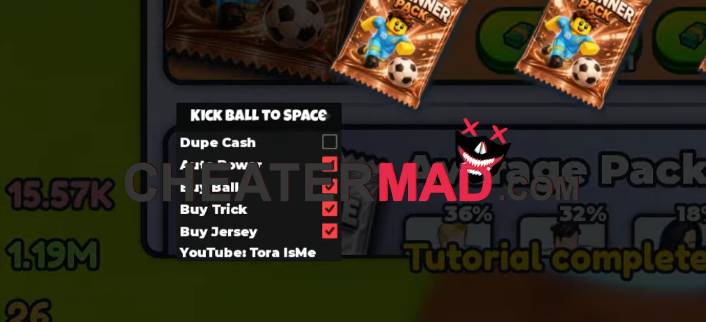
This game is a straight power race, so Dupe Cash gives you the funds to skip the grind entirely, and Auto Power puts that cash straight into your kicking strength. Auto Buy Ball, Auto Buy Trick, and Auto Buy Jersey then spend the rest on every upgrade and cosmetic available, so your whole loadout keeps improving without you checking the shop yourself. It works much like the setup players use for the Cut a Gem Script.
How To Use Kick Ball to Space Script
- Launch Kick Ball to Space on Roblox
- Open Xeno Executor
- Copy the script code below
- Paste it into Xeno and press Execute
- Open the in-game menu and toggle the features you want
Kick Ball to Space Script Code:
loadstring(game:HttpGet("https://raw.githubusercontent.com/gumanba/Scripts/refs/heads/main/KickBalltoSpace", true))()
