


Volleyball Legends Scripts is a toolkit that was designed to be used with Volleyball Legends, a highly popular competitive sports game, and gives players a tremendous edge on the field. This game, which has always been characterized by its emphasis on time, reflexes and strategy, provides a far better and quicker gameplay response with Volleyball Legends Scripts support. It has become far simpler to beat your rivals both in the singles and in the tournaments.
Free Volleyball Legends Scripts Codes
Volleyball Legends Script: Auto Farm, Ball Predictor, Aim Lock to Enemy & More!
loadstring(game:HttpGet("https://raw.githubusercontent.com/aronn5/Zobra-hub/refs/heads/main/zobra.lua"))()
Volleyball Legends: Silent Aim, Hitbox Changer, Player Features
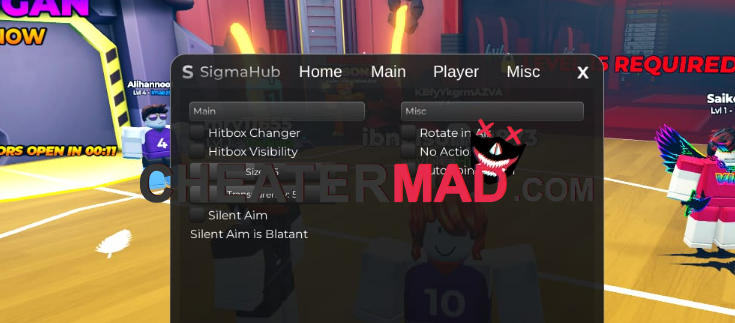
Napoleon Hub Volleyball Legends Script: Hitbox, Esp, Player Features
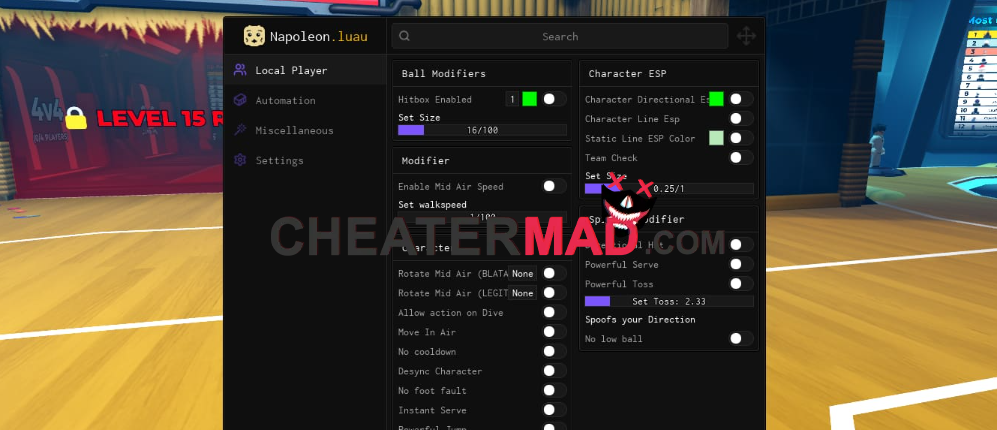
loadstring(game:HttpGet("https://raw.githubusercontent.com/raydjs/napoleonHub/refs/heads/main/src.lua"))()
Sterling Hub Volleyball Legends Script: Auto Farm, Hitbox
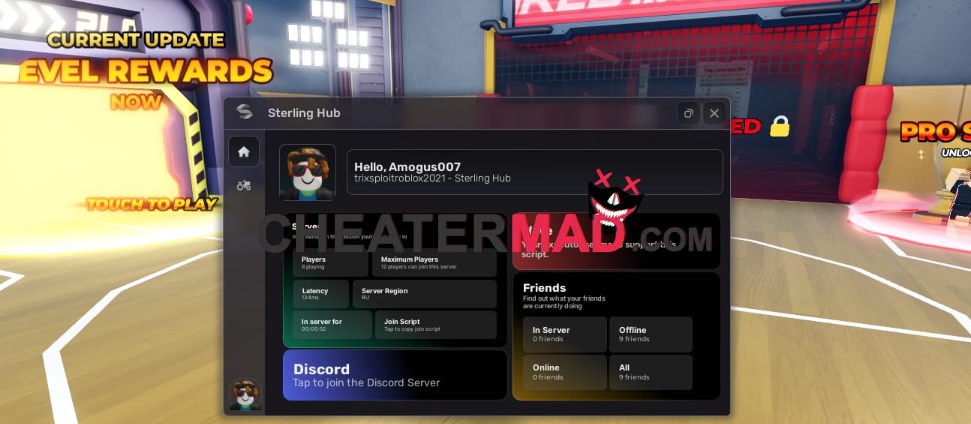
local Luna = loadstring(game:HttpGet("https://paste.ee/r/WSCKThwW", true))()

local HttpService = game:GetService("HttpService")

local configFile = "SterlingHubHaikyuuConfig.json"

local http = game:GetService("HttpService")

local userId = game.Players.LocalPlayer.UserId

--local blacklist = {1131586622, 1225643250, 1918988070}

--for _, id in pairs(blacklist) do

--   if userId == id then

--        game.Players.LocalPlayer:Kick("Access revoked from using Sterling Hub.")

--    end

--end


local config = {

    spikePower = 1,

    diveSpeed = 1,

    blockPower = 1,

    bumpPower = 1,

    servePower = 1,

    jumpPower = 1,

    speed = 1,

    setPower = 1,

    powerfulServeEnabled = false,

    spikeHitbox = 10,

    bumpHitbox = 10,

    diveHitbox = 10,

    setHitbox = 10,

    serveHitbox = 10,

    blockHitbox = 10,

    tiltPower = 1,

    jumpsetHitbox = 10,

    autoRotate = false

}


-- Load configuration function

local function loadConfig()

    if isfile(configFile) then

        local data = readfile(configFile)

        local success, result = pcall(function()

            return game:GetService("HttpService"):JSONDecode(data)

        end)

        if success then

            for k, v in pairs(result) do

                config[k] = v  -- Update config fields directly

            end

        end

    end

end


local function saveConfig()

    local data = game:GetService("HttpService"):JSONEncode(config)  -- Encode the config directly

    writefile(configFile, data)

end


-- Save configuration function

local function saveConfig()

    local data = game:GetService("HttpService"):JSONEncode(config)  -- Encode the config directly

    writefile(configFile, data)

end


-- Auto-load configuration on script start

loadConfig()


local Window = Luna:CreateWindow({

    Name = "Sterling Hub",

    Subtitle = nil,

    LogoID = "90804827107744",

    LoadingEnabled = true,

    LoadingTitle = "Sterling Hub",

    LoadingSubtitle = "by DAN",

    ConfigSettings = {

        RootFolder = nil,

        ConfigFolder = "Sterling Hub"

    },

})


Window:CreateHomeTab({

    SupportedExecutors = {},

    DiscordInvite = "J37PW97j6a",

    Icon = 1,

})


local Tab = Window:CreateTab({

    Name = "Auto Farm",

    Icon = "agriculture",

    ImageSource = "Material",

    ShowTitle = true

})


local player = game.Players.LocalPlayer

local humanoid = player.Character:WaitForChild("Humanoid")

local humanoidRootPart = player.Character:WaitForChild("HumanoidRootPart")

local VirtualInputManager = game:GetService("VirtualInputManager")


local isRunning = false -- Tracks the toggle state


-- Functions

local function pressSpace()

    VirtualInputManager:SendKeyEvent(true, Enum.KeyCode.Space, false, game)

    task.wait(0.1)

    VirtualInputManager:SendKeyEvent(false, Enum.KeyCode.Space, false, game)

end


local function pressClick()

    VirtualInputManager:SendMouseButtonEvent(0, 0, 0, true, game, 1)

    VirtualInputManager:SendMouseButtonEvent(0, 0, 0, false, game, 1)

end


local function getRandomTargetPart()

    local positionsFolder = workspace.Map.BallNoCollide.Positions["2"]

    local parts = {}


    for _, part in ipairs(positionsFolder:GetChildren()) do

        if part:IsA("BasePart") then

            table.insert(parts, part)

        end

    end


    if #parts > 0 then

        return parts[math.random(1, #parts)]

    end

    return nil

end


local player = game.Players.LocalPlayer

local roundOverStats = player.PlayerGui.Interface.RoundOverStats

local backBtn = roundOverStats.BackBtn

local VirtualInputManager = game:GetService("VirtualInputManager")

local boundaryFolder = workspace:WaitForChild("Map"):WaitForChild("BallNoCollide"):WaitForChild("Boundaries")


local VirtualInputManager = game:GetService("VirtualInputManager")


local function pressEscTwice()

    -- First press with delay of 0.3 seconds

    task.wait(5)


    VirtualInputManager:SendKeyEvent(true, Enum.KeyCode.Escape, false, game)  -- Key down

    VirtualInputManager:SendKeyEvent(false, Enum.KeyCode.Escape, false, game) -- Key up

    task.wait(0.3) -- First delay (adjustable)


    -- Second press with delay of 0.7 seconds

    VirtualInputManager:SendKeyEvent(true, Enum.KeyCode.Escape, false, game)  -- Key down

    VirtualInputManager:SendKeyEvent(false, Enum.KeyCode.Escape, false, game) -- Key up

    task.wait(0.7) -- Second delay (adjustable)


    print("Esc key pressed twice with different delays!")

end


local escPressed = false -- Flag to track if Esc has been pressed


local function checkRoundOverStats()

    while true do

        -- Check if RoundOverStats is visible

        if roundOverStats.Visible then

            -- Only press Esc if it hasn't been pressed already

            if not escPressed then

                pressEscTwice()  -- Call pressEscTwice only once when the GUI becomes visible

                escPressed = true  -- Set the flag to prevent multiple presses

            end

        else

            -- Reset the flag when the RoundOverStats GUI is hidden

            escPressed = false

        end

        task.wait(0.5)  -- Check every 0.5 seconds

    end

end


-- Toggle for all functionality

Tab:CreateToggle({

    Name = "Auto Farm",

    Description = "Toggle Auto Farm",

    CurrentValue = false,

    Callback = function(Value)

        isRunning = Value

        print("All functionality is now " .. (Value and "enabled" or "disabled"))

    end

})


local function isInsidePart(part, position)

    local size = part.Size / 2

    local center = part.Position

    return math.abs(position.X - center.X) <= size.X

        and math.abs(position.Y - center.Y) <= size.Y

        and math.abs(position.Z - center.Z) <= size.Z

end


local boundaryFolder = workspace:WaitForChild("Map"):WaitForChild("BallNoCollide"):WaitForChild("Boundaries")


if not boundaryFolder then

    warn("Boundary folder not found! Check the path.")

    return

end


local ballPrefix = "CLIENT_BALL_"


-- Function to find the ball

local function getBall()

    for _, object in pairs(workspace:GetChildren()) do

        if object:IsA("Model") and object.Name:match(ballPrefix) then

            return object:FindFirstChild("Sphere.001") or object:FindFirstChild("Cube.001")

        end

    end

    return nil

end


-- Start checking RoundOverStats visibility in parallel

task.spawn(checkRoundOverStats)


task.spawn(function()

    while task.wait(0.3) do

        if not isRunning then

            continue

        end


        -- Ball tracking logic

        local ballPart = getBall()


        if ballPart then

            -- Move to the ball

            humanoid:MoveTo(ballPart.Position)


            local distance = (ballPart.Position - humanoidRootPart.Position).Magnitude


            if distance <= 15 then

                local targetPart = getRandomTargetPart()

                if targetPart then

                    -- Adjust character to face the target part

                    local lookVector = (targetPart.Position - humanoidRootPart.Position).Unit

                    humanoidRootPart.CFrame = CFrame.new(humanoidRootPart.Position, humanoidRootPart.Position + lookVector)

                end


                -- Jump and interact if the ball is above the player

                if ballPart.Position.Y > humanoidRootPart.Position.Y + 5 then

                    pressSpace()

                    pressClick()

                end

            end

        end

    end

end)


-- Declare the player

local player = game.Players.LocalPlayer

local enablejoin = false

local VirtualInputManager = game:GetService("VirtualInputManager")


-- Function to handle team selection (called after the reset)

local function teamSelection()

    if not enablejoin then return end


    task.wait(10)


    -- Check if Team Selection GUI exists and can be accessed

    local teamSelectionGui = player.PlayerGui.Interface.TeamSelection

    local gameInterface = player.PlayerGui.Interface.Game


    -- Only make the team selection GUI visible if the game interface is not yet visible

    if not gameInterface.Visible then

        teamSelectionGui.Visible = true

    end


    while not gameInterface.Visible and enablejoin do

        -- Select a random number between 1 and 6

        local randomNum = math.random(1, 6)

        local button = teamSelectionGui["2"][tostring(randomNum)]


        if button and button:IsA("ImageButton") then

            local absPos = button.AbsolutePosition

            local absSize = button.AbsoluteSize

            local clickPosition = absPos + (absSize / 2) -- Center of the button


            -- Simulate mouse button down

            VirtualInputManager:SendMouseButtonEvent(clickPosition.X, clickPosition.Y, 0, true, game, 1)

            -- Simulate mouse button up

            VirtualInputManager:SendMouseButtonEvent(clickPosition.X, clickPosition.Y, 0, false, game, 1)

        end


        -- Add a random delay between clicks to simulate human-like behavior

        task.wait(math.random(5, 15) / 10) -- Delay between 0.5 and 1.5 seconds

    end


    -- Hide the team selection GUI when the game GUI becomes visible

    if gameInterface.Visible then

        teamSelectionGui.Visible = false

    end

end


-- Listen for the player's character reset and re-trigger the team selection

player.CharacterAdded:Connect(function(character)

    -- If the toggle is on, start the team selection after the reset

    if enablejoin then

        -- Wait a bit to make sure the character has fully loaded

        teamSelection()

    end

end)


-- Toggle for Auto Join Match (waiting 30 seconds before starting team selection)

Tab:CreateToggle({

    Name = "Auto Join Match",

    Description = "Automatically join a match after waiting for 30 seconds(to avoid getting bugged)",

    CurrentValue = false,

    Callback = function(Value)

        enablejoin = Value

        if enablejoin then

            -- Wait 30 seconds before starting the team selection

            teamSelection()

        end

    end

})

Tab:CreateSection("Misc")

local autoRotateConnection -- Variable to hold the Heartbeat connection
local function autorotateon()

    local player = game.Players.LocalPlayer

    local humanoid = player.Character:WaitForChild("Humanoid")

    -- Start monitoring AutoRotate

    autoRotateConnection = game:GetService("RunService").Heartbeat:Connect(function()

        if humanoid.AutoRotate == false then

            humanoid.AutoRotate = true

            print("AutoRotate has been re-enabled.")

        end

    end)

end
local function autorotateoff()

    -- Stop monitoring AutoRotate

    if autoRotateConnection then

        autoRotateConnection:Disconnect()

        autoRotateConnection = nil

        print("AutoRotate monitoring has been disabled.")

    end

end
-- Toggle for enabling/disabling AutoRotate monitoring

Tab:CreateToggle({

    Name = "Enable Rotate In The Air",

    Description = "Toggle Rotate In The Air(Re-Enable This When You Switch Team",

    CurrentValue = config.autoRotate,

    Callback = function(State)

        config.autoRotate = State

        saveConfig()

        print("Toggle Rotate is now " .. (State and "enabled" or "disabled"))
        if State then

            autorotateon() -- Enable monitoring

        else

            autorotateoff() -- Disable monitoring

        end

    end

})
local Button = Tab:CreateButton({

Name = "Break The Match",

Description = "Stops the match(must be serving)",

    Callback = function()
local ohNil1 = nil

local ohNumber2 = 0.95
game:GetService("ReplicatedStorage").Packages._Index["[email protected]"].knit.Services.GameService.RF.Serve:InvokeServer(ohNil1, ohNumber2)

    end

})
local UserInputService = game:GetService("UserInputService")
-- Create the toggle UI element

Tab:CreateToggle({

    Name = "Enable Powerful Serve",

    Description = "Press Z to Powerful Serve",

    CurrentValue = config.powerfulServe,

    Callback = function(State)

        powerfulServe = State

        config.powerfulServeEnabled = State

        saveConfig()  -- Save the config after toggling

    end

})
UserInputService.InputBegan:Connect(function(input, gameProcessedEvent)

    if not gameProcessedEvent and input.KeyCode == Enum.KeyCode.Z then

        if powerfulServe then

            game:GetService("ReplicatedStorage").Packages._Index["[email protected]"].knit.Services.GameService.RF.Serve:InvokeServer(Vector3.new(0, 0, 0), math.huge)
        end
    end

end)
local Tab = Window:CreateTab({
    Name = "Misc",
    Icon = "autorenew",
    ImageSource = "Material",
    ShowTitle = true

})
Tab:CreateSection("Stat Changer")

local Slider = Tab:CreateSlider({

    Name = "Dive Speed",

    Range = {0, 5},

    Increment = 0.1,

    CurrentValue = config.diveSpeed,

    Callback = function(value)

        game.Players.LocalPlayer:SetAttribute("GameDiveSpeedMultiplier", value)

        print("Dive Speed updated to " .. value)

        config.diveSpeed = value

        saveConfig()

    end

})
local Slider = Tab:CreateSlider({

    Name = "Spike Power",

    Range = {0, 500},

    Increment = 0.1,

    CurrentValue = config.spikePower,

    Callback = function(value)

        game.Players.LocalPlayer:SetAttribute("GameSpikePowerMultiplier", value)

        print("Spike Power updated to " .. value)

        config.spikePower = value

        saveConfig()
    end
})
local Slider = Tab:CreateSlider({

    Name = "Tilt Power",

    Range = {0, 500},

    Increment = 0.1,

    CurrentValue = config.tiltPower,

    Callback = function(value)

        game.Players.LocalPlayer:SetAttribute("GameTiltPowerMultiplier", value)

        print("Tilt Power updated to " .. value)

        config.tiltPower = value

        saveConfig()
    end
})
local Slider = Tab:CreateSlider({

    Name = "Speed",

    Range = {0, 1.5},

    Increment = 0.1,

    CurrentValue = config.speed,

    Callback = function(value)

        game.Players.LocalPlayer:SetAttribute("GameSpeedMultiplier", value)

        print("Speed updated to " .. value)

        config.speed = value

        saveConfig()
    end
})
local Slider = Tab:CreateSlider({

    Name = "Set Power",

    Range = {0, 500},

    Increment = 0.1,

    CurrentValue = config.setPower,

    Callback = function(value)

        game.Players.LocalPlayer:SetAttribute("GameSetPowerMultiplier", value)

        print("Set Power updated to " .. value)

        config.setPower = value

        saveConfig()
    end
})
local Slider = Tab:CreateSlider({

    Name = "Serve Power",

    Range = {0, 500},

    Increment = 0.1,

    CurrentValue = config.servePower,

    Callback = function(value)

        game.Players.LocalPlayer:SetAttribute("GameServePowerMultiplier", value)

        print("Serve Power updated to " .. value)

        config.servePower = value

        saveConfig()

    end
})
local Slider = Tab:CreateSlider({

    Name = "Jump Power",

    Range = {0, 5},

    Increment = 0.1,

    CurrentValue = config.jumpPower,

    Callback = function(value)

        game.Players.LocalPlayer:SetAttribute("GameJumpPowerMultiplier", value)

        print("Jump Power updated to " .. value)

        config.jumpPower = value

        saveConfig()

    end
})
local Slider = Tab:CreateSlider({

    Name = "Bump Power",

    Range = {0, 500},

    Increment = 0.1,

    CurrentValue = config.bumpPower,

    Callback = function(value)

        game.Players.LocalPlayer:SetAttribute("GameBumpPowerMultiplier", value)

        print("Bump Power updated to " .. value)

        config.bumpPower = value

        saveConfig()

    end
})
local Slider = Tab:CreateSlider({

    Name = "Block Power",

    Range = {0, 500},

    Increment = 0.1,

    CurrentValue = config.blockPower,

    Callback = function(value)

        game.Players.LocalPlayer:SetAttribute("GameBlockPowerMultiplier", value)

        print("Block Power updated to " .. value)

        config.blockPower = value

        saveConfig()

    end
})
local Hitbox = Window:CreateTab({
    Name = "Hitboxes",
    Icon = "settings",
    ImageSource = "Material",
    ShowTitle = true
})
Hitbox:CreateSection("Hitbox Extender")
local Slider = Hitbox:CreateSlider({
    Name = "Spike Hitbox Size",
    Range = {1, 100}, -- Adjust the range as needed
    Increment = 0.1,
    CurrentValue = config.spikeHitbox,
    Callback = function(value)
        local spikeHitbox = game:GetService("ReplicatedStorage").Assets.Hitboxes.Spike
        local part = spikeHitbox:FindFirstChild("Part") -- Ensure we get the correct Part
        if part and part:IsA("BasePart") then
            -- Update the size of the part for all axes (X, Y, Z)
            part.Size = Vector3.new(value, value, value)
            print("Spike Part size updated to " .. tostring(part.Size))
    config.spikeHitbox = value
    saveConfig()
        else
            warn("Part not found in Spike hitbox!")
        end
    end
})
local Slider = Hitbox:CreateSlider({
    Name = "Jump Set Hitbox Size",
    Range = {1, 100}, -- Adjust the range as needed
    Increment = 0.1,
    CurrentValue = config.jumpsetHitbox,
    Callback = function(value)
        local jumpset = game:GetService("ReplicatedStorage").Assets.Hitboxes.JumpSet
        local part = jumpset:FindFirstChild("Part") -- Ensure we get the correct Part
        if part and part:IsA("BasePart") then
            -- Update the size of the part for all axes (X, Y, Z)
            part.Size = Vector3.new(value, value, value)
            print("Spike Part size updated to " .. tostring(part.Size))
    config.jumpsetHitbox = value
    saveConfig()
        else
            warn("Part not found in Jump Set hitbox!")
        end
    end
})
local Slider = Hitbox:CreateSlider({
    Name = "Set Hitbox Size",
    Range = {1, 100}, -- Adjust the range as needed
    Increment = 0.1,
    CurrentValue = config.setHitbox,
    Callback = function(value)
        local setHitbox = game:GetService("ReplicatedStorage").Assets.Hitboxes.Set
        local part = setHitbox:FindFirstChild("Part") -- Ensure we get the correct Part
        if part and part:IsA("BasePart") then
            -- Update the size of the part for all axes (X, Y, Z)
            part.Size = Vector3.new(value, value, value)
            print("Set Part size updated to " .. tostring(part.Size))
    config.setHitbox = value
    saveConfig()
        else
            warn("Part not found in Set hitbox!")
        end
    end
})
local Slider = Hitbox:CreateSlider({
    Name = "Serve Hitbox Size",
    Range = {1, 100}, -- Adjust the range as needed
    Increment = 0.1,
    CurrentValue = config.serveHitbox,
    Callback = function(value)
        local serveHitbox = game:GetService("ReplicatedStorage").Assets.Hitboxes.Serve
        local part = serveHitbox:FindFirstChild("Part") -- Ensure we get the correct Part
        if part and part:IsA("BasePart") then
            -- Update the size of the part for all axes (X, Y, Z)
            part.Size = Vector3.new(value, value, value)
            print("Serve Part size updated to " .. tostring(part.Size))
    config.serveHitbox = value
    saveConfig()
        else
            warn("Part not found in Serve hitbox!")
        end
    end
})
local Slider = Hitbox:CreateSlider({
    Name = "Dive Hitbox Size",
    Range = {1, 100}, -- Adjust the range as needed
    Increment = 0.1,
    CurrentValue = config.diveHitbox,
    Callback = function(value)
        local diveHitbox = game:GetService("ReplicatedStorage").Assets.Hitboxes.Dive
        local part = diveHitbox:FindFirstChild("Part") -- Ensure we get the correct Part
        if part and part:IsA("BasePart") then
            -- Update the size of the part for all axes (X, Y, Z)
            part.Size = Vector3.new(value, value, value)
            print("Dive Part size updated to " .. tostring(part.Size))
    config.diveHitbox = value
    saveConfig()
        else
            warn("Part not found in Dive hitbox!")
        end
    end
})
local Slider = Hitbox:CreateSlider({
    Name = "Bump Hitbox Size",
    Range = {1, 100}, -- Adjust the range as needed
    Increment = 0.1,
    CurrentValue = config.bumpHitbox,
    Callback = function(value)
        local bumpHitbox = game:GetService("ReplicatedStorage").Assets.Hitboxes.Bump
        local part = bumpHitbox:FindFirstChild("Part") -- Ensure we get the correct Part
        if part and part:IsA("BasePart") then
            -- Update the size of the part for all axes (X, Y, Z)
            part.Size = Vector3.new(value, value, value)
            print("Bump Part size updated to " .. tostring(part.Size))
    config.bumpHitbox = value
    saveConfig()
        else
            warn("Part not found in Bump hitbox!")
        end
    end
})
local Slider = Hitbox:CreateSlider({

    Name = "Block Hitbox Size",

    Range = {1, 100}, -- Adjust the range as needed

    Increment = 0.1,

    CurrentValue = config.blockHitbox,

    Callback = function(value)

        local blockHitbox = game:GetService("ReplicatedStorage").Assets.Hitboxes.Block

        local part = blockHitbox:FindFirstChild("Part") -- Ensure we get the correct Part

        if part and part:IsA("BasePart") then

            -- Update the size of the part for all axes (X, Y, Z)

            part.Size = Vector3.new(value, value, value)

            print("Block Part size updated to " .. tostring(part.Size))

    config.blockHitbox = value

    saveConfig()

else
            warn("Part not found in Block hitbox!")
        end
    end
})
local Spin = Window:CreateTab({

    Name = "Auto Spin",

    Icon = "shopping_cart",

    ImageSource = "Material",

    ShowTitle = true
})
local autoSpin = false
local Toggle = Spin:CreateToggle({
Name = "Auto Spin",
Description = nil,
CurrentValue = false,
Callback = function(Value)
autoSpin = Value
if autoSpin then
print("Auto Spin Enabled")
startAutoSpin()
else
print("Auto Spin Disabled")
end
end
})
local desiredStyles = {}  -- A table to store multiple selected styles
local Dropdown = Spin:CreateDropdown({
Name = "Select Desired Style",
Description = "Choose your desired style",
Options = {"Oikawa", "Bokuto", "Kageyama", "Sawamura", "Ushijima", "Kozume", "Kuroo", "Yamamoto", "Azumane", "Yaku", "Hinata"},
CurrentOption = {"Hinata"},
MultipleOptions = true,
SpecialType = nil,
Callback = function(Option)
desiredStyles = Option  -- Update the selected styles (can be multiple)
print("Selected Styles:", table.concat(desiredStyles, ", "))
end
})
-- Function to Display Notification
function showNotification(styleName)
Luna:Notification({
Title = "Style Obtained!",
Icon = "check_circle",  -- You can use other Material icons
ImageSource = "Material",
Content = "You successfully obtained the style: " .. styleName,
})
end
-- Function to Perform Auto Spin
function startAutoSpin()
coroutine.wrap(function()
while autoSpin do
local currentStyle = game:GetService("Players").LocalPlayer.PlayerGui.Interface.Lobby.Styles.TopPanel.DisplayName.Text
if table.find(desiredStyles, currentStyle) then  -- Check if the current style is in the selected styles
print("STOP! You got:", currentStyle)
autoSpin = false  -- Stop spinning automatically
showNotification(currentStyle)  -- Show notification
break
else
game:GetService("ReplicatedStorage").Packages._Index["[email protected]"].knit.Services.StylesService.RF.Roll:InvokeServer(false)
print("Spinning... Current result:", currentStyle)
wait(0.5)  -- Delay between spins
end
end
end)()
end
This Volleyball Legends Scripts has advanced features such as Auto Farm, Auto Spin, Hitbox Extender, WalkSpeed, Health and Stamina, all of which considerably enhance the performance of the player. Training processes are automated by Auto Farm and this allows continuous improvement.
Fire Hub Volleyball Legends: Auto Farm, Auto Spin, Hitbox Extender
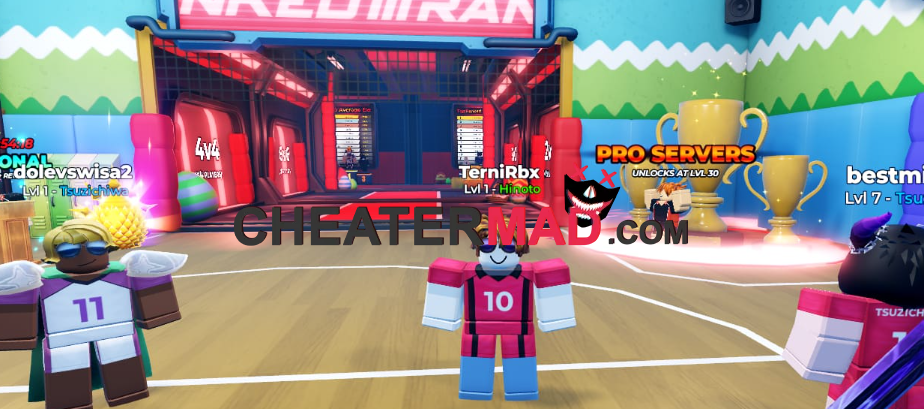
loadstring(game:HttpGet("https://raw.githubusercontent.com/HmizoBeamzz/KAIKYUU-LEGEND/refs/heads/main/473860dd7d7331fc.txt",true))()
Auto Spin assists you in gaining random rewards fast and Hitbox Extender can increase your area of contact which gives you a huge advantage when serving and blocking. WalkSpeed Mobility is enhanced and a higher level of Health and Stamina enables you to keep a steady pace over a longer duration.
Why be content to be just another wannabe on the court when you can make a difference right now by downloading this free cheat file at cheatermad.com. This special roblox script is geared towards enabling you to play stronger, faster and smarter each and every moment on the court.
How to use Volleyball Legends Scripts
- Turn on your Volleyball Legends Game.
- Embed the any Hub Code for script
- Run it Take in the material presented here.
