


He Ate Them Script gives you full visibility and a fast route through the chapters in this Roblox horror game. Monster ESP shows where the monster is at all times, and Objective ESP, Prompt ESP, and Trigger ESP highlight everything you need to interact with, similar to the layered ESP behind the Don’t Look Back Script, another horror game where knowing where the threat and the objectives are decides most runs.
He Ate Them Script Features
- Monster ESP: shows the monster’s location around the map
- Objective / Prompt / Trigger ESP: highlights objectives, prompts, and triggers
- Skip Chase To Elevator: skips the chase sequence
- Teleport Next Objective / Teleports: jumps to your next objective
- Instant Finish Current Chapter: completes the current chapter instantly
- Claim Current Chapter Badges: claims the chapter’s badges
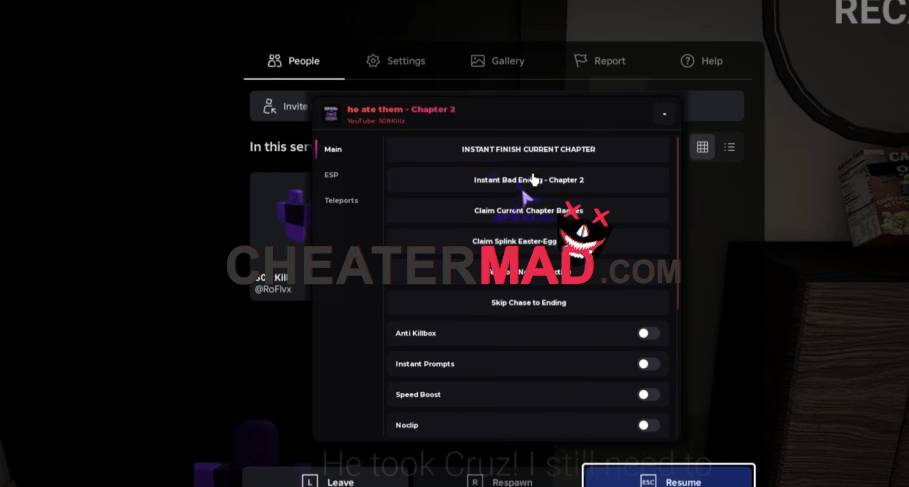
The chapter tools remove the hardest parts. Skip Chase To Elevator ends the chase sequence, Teleport Next Objective and the extra Teleports take you straight to what comes next, and Instant Finish Current Chapter completes a chapter outright. Claim Current Chapter Badges collects the badges tied to it, the same kind of shortcut-to-the-exit approach behind the House of The Locust Script, where reaching the end quickly matters more than exploring every room.
How To Use He Ate Them Script
- Load into He Ate Them and open your executor
- Paste the script code below
- Execute and wait for the menu
- Turn on Monster ESP and Objective ESP first, then use Skip Chase To Elevator and Teleport Next Objective as you progress
Script Code:
loadstring(game:HttpGet("https://gist.githubusercontent.com/user2084375/ef0c1434dc71b6bec4349ee57b04f1b5/raw/66f8d272ceecb1117226b0c7fd72a5850403399f/gistfile1.txt"))()
